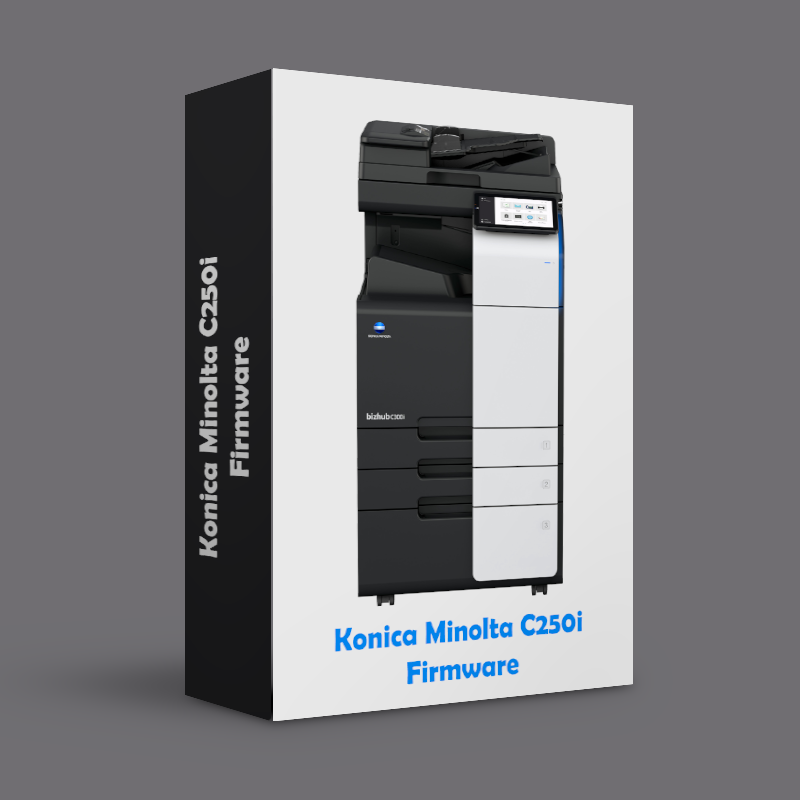
C250i Firmware G00-KJ
$10,00
Konica Minolta C250i Firmware Update – Latest Official Version for Enhanced Printer Performance and Reliability
Ensure your Konica Minolta C250i multifunction printer stays at peak performance with the latest official firmware update. This firmware upgrade is specifically designed to improve your printer’s functionality, fix any known issues, and provide new features to enhance overall usability and efficiency. Whether you’re in an office setting or running a large enterprise, keeping your printer up-to-date is crucial for maintaining optimal printing quality and smooth operation.
Description
Konica Minolta C250i Firmware Update – Latest Official Version for Enhanced Printer Performance and Reliability
Ensure your Konica Minolta C250i multifunction printer stays at peak performance with the latest official firmware update. This firmware upgrade is specifically designed to improve your printer’s functionality, fix any known issues, and provide new features to enhance overall usability and efficiency. Whether you’re in an office setting or running a large enterprise, keeping your printer up-to-date is crucial for maintaining optimal printing quality and smooth operation.
Why You Need the Konica Minolta C250i Firmware Update:
-
Improved Printer Performance: The latest firmware enhances the speed and responsiveness of your printer, ensuring faster print jobs and improved handling of high-volume printing tasks.
-
Bug Fixes and Stability: This update resolves any previous bugs or system glitches, ensuring that your device runs smoothly without interruptions or errors.
-
New Features and Functionality: Gain access to additional features and upgrades that improve your printer’s functionality, including better paper handling, faster network connectivity, and more customizable settings.
-
Optimized for Efficiency: The update helps reduce energy consumption and improves print quality, all while ensuring that your printer works efficiently, even during peak usage hours.
-
Enhanced Security: With regular firmware updates, you ensure that your printer is safeguarded against potential security vulnerabilities, protecting sensitive information and preventing unauthorized access.
-
Simple Installation Process: The firmware update is designed to be easy to install, with step-by-step instructions that allow you to upgrade your printer without needing professional assistance.
Benefits of Keeping Your Konica Minolta C250i Firmware Updated:
-
Business Continuity: A well-maintained printer leads to fewer breakdowns and disruptions in your business operations. This firmware ensures your Konica Minolta C250i is always performing at its best.
-
Cost Savings: Regular updates ensure that your printer remains energy-efficient and avoids costly repairs, reducing the need for service calls.
-
Longer Printer Lifespan: Firmware updates help optimize the performance of your printer, extending its lifespan and allowing you to get the most out of your investment.
Perfect for Businesses and Offices: Whether you’re running a small office or managing a large-scale business, ensuring that your Konica Minolta C250i printer is running the latest firmware is essential for maximizing productivity, reducing downtime, and ensuring high-quality printouts every time.
Program Release Information
DL-No. DLKM_BT2118639EN
Product name: 36C-0i Series
Subject: <MR> [36C-0i Series] [FW ver. G00-KJ] Function Version 2.2 Maintenance Release 1
2021/11/26
1. Release version and download file name
The newly released program version and download file name is as follows.
[Release version]
<36C-0i Series MFP firmware>
|
Model |
Program Name |
Current Ver. |
New Ver. |
Program File Name |
|
36C-0i Series |
MFP firmware |
G00-K8 |
G00-KJ |
FW_AA2J0Y0-F000-G00-KJ.exe |
[Download File Name]
FW_AA2J0Y0-F000-G00-KJ.exe
IT6_2.1_LDD_installation_procedure.pdf
PRI_36C-0i_Series_DLKM_BT2118639EN_**.doc
2. What changed
2.1. Release of <MR> [36C-0i Series] [FW ver. G00-KJ] Function Version 2.2 Maintenance Release 1
The individual files are as follows.
|
Program Name |
File Name |
Note |
|
MFP Card Version |
AA2J0Y0-F000-G00-KJ |
|
|
Linux-based MFP Controller |
Linux-4.4.8 |
|
|
MFP Controller Kernel Program |
AA2J0Y0-1C00-G00-B4 |
|
|
MFP Controller Subset |
AA2J0Y0-1F00-G00-KH |
|
|
MFP Controller |
AA2J0Y0-0100-G00-KJ |
|
|
MFP Controller System |
AA2J0Y0-1000-G00-KJ |
|
|
MFP Controller Print Controller |
AA2J0Y0-3000-G00-M1 |
|
|
MFP Controller Print Controller Font |
AA2J0Y0-3F00-G00-M0 |
|
|
MFP Controller Print Controller Demo Page |
AA2J0Y0-3E00-G00-00 |
|
|
Image Reader Controller |
AA2J0Y0-8600-G00-J0 |
|
|
MFP Controller MIO |
AA2J0Y0-5000-G00-60 |
|
|
MFP Controller PIC |
AA2J0Y0-8200-G00-F6 |
|
|
MFP Controller PIC Image Parameter |
AA2J0Y0-8A01-G00-12 |
|
|
MFP Controller Thread Image Parameter |
AA2J0Y0-8B10-G00-00 |
|
|
MFP Controller IR Image Parameter |
AA2J0Y0-8C01-G00-00 |
|
|
FAX board controller |
A8790Y0-4000-G00-31 |
|
|
Operation panel message data |
AA2J0Y0-8100-G00-K3 |
|
|
MFP Controller OSL |
AA7N0Y0-G000-G07-02 |
|
|
MFP Controller CHR |
ACKN0Y0-G100-G17-06 |
|
|
MFP Controller NDJ |
AA7N0Y0-G200-G16-25 |
|
|
ADF (DF-632) |
AAYH0Y0-0024-G00-02 |
|
|
ADF (DF-714) |
AAMN0Y0-0024-G00-03 |
|
|
Machine Controller |
AA2J0Y0-0200-G00-B0 |
|
|
Machine Controller Printer |
AA2J0Y0-0220-G00-B0 |
|
|
Machine Controller Media |
AA2J0Y0-0230-G00-01 |
|
|
Machine Controller Scanner |
AA2J0Y0-0300-G00-11 |
|
|
Finisher (FS-536) |
A87G0Y0-0071-G00-14 |
|
|
Finisher (FS-533) |
A2YU0Y0-0071-G10-05 |
|
|
Finisher (FS-539) |
AAR40Y0-0071-G00-09 |
|
|
Separator (JS-506) |
A2YV0Y0-0070-G00-01 |
|
|
SD (FS-536SD) |
A3ER0Y0-0071-G10-02 |
|
|
SD(FS-539SD/FS-540SD) |
A3ER0Y0-0071-G20-05 |
|
|
DSC |
A0P00Y0-8500-G00-01 |
|
|
OCR Library |
AA2J0Y0-B000-G00-00 |
|
|
Panel Sound Data |
AA2J0Y0-C200-G00-01 |
|
|
Integrated Printer Driver Version |
6-2.2a-0-G00-KJ |
|
2.2. Fixed issues
The communication between MFP and WWRSPF will stop if FW G00-J9 or later is used with Function Version 1.0.
Please refer to PSKM_BT2116033EN for detail.
Image Controller Setting is not displayed on FW G00-J9 or later.
Please refer to PSKM_BT2117763EN for detail.
When picking-up plain paper or recycled paper from bypass tray, the edge of the last paper would be folded.
Engine DipSW No.10
OFF:Disable countermeasure
ON:Enable countermeasure
Paper jam with envelope after replacing fusing unit.
Engine DipSW No.92
OFF:Disable
ON:Enable(Perform aging of fusing unit just after replacing it to avoid paper jam with envelope)
Improve reliability of Dram unit life. Note: Target models: C450i – C750i, bh450i – 750i.
3. Cautions and Restrictions
PDF/A scan function is standardized in the firmware G00-E9 and later versions.
Therefore, PDF/A function that was provided by LK-102 will be enabled once the firmware is installed. If PDF/A Font Data is not installed, the error message will be displayed.
Please be sure confirm PDF/A Font Data is installed in the machine when installing this firmware. Refer KNOVA-PS “PSKM_BT2022690EN” for details.
4. System Requirements
Using with the latest version programs is recommended.
5. How to install
Please refer to Service Manual.
Refer to “IT6_2.1_LDD_installation_procedure.pdf” when updating the FW on a machine with a LDD installed.
<Function Version>
About Software Switch Settings
Switch No.: 25
HEX Assignment: 00 -> Function Version 1.0
HEX Assignment: 10 -> Function Version 2.0
HEX Assignment: 20 -> Function Version 2.1
HEX Assignment: 30 -> Function Version 2.2
6. OpenAPI supported function level
The following is OpenAPI supported function level on this firmware.
OpenAPI:
|
OpenAPI Function Level |
5.6 |
Detail:
|
Auth |
3.5/3.6/3.7/4.0/4.1/4.2/4.5/4.6/4.7/4.8/4.9/4.10/4.11/4.12/4.13/5.0/5.1/5.5 |
|
|
Scan to Application |
3.5/3.6/3.7/4.0/4.5/4.6/4.8/4.9/4.10/4.12 |
|
|
PullPrint |
3.5/3.6/4.0/4.5/4.6/4.7/4.8/4.9/4.10/4.12/4.13 |
|
|
Other A |
3.5/4.0 |
|
|
Job Management |
3.5/3.6/4.0/4.10 |
|
|
Setup |
3.5/3.6/3.7/3.8/4.0/4.1/4.2/4.5/4.6/4.7/4.8/4.9/4.10/4.11/4.12/ 4.13/5.0/5.1/5.2/5.3/5.4/5.5/5.6 |
|
|
Link |
4.5/4.6/4.7/4.8/4.9/4.10/4.11/4.12/4.13/5.0/5.1/5.5 |
|
|
Web Browser |
Auth |
3.5/3.6/3.7/4.0/4.1/4.2/4.5/4.7/4.8/4.9/4.10/4.11/4.13/5.0/5.1/5.5 |
|
Scan to Application |
3.5/3.6/3.7/4.0/4.1/4.5/4.6/4.7/4.8/4.9/4.10/4.12 |
|
|
PullPrint |
3.5/3.6/4.0/4.1/4.5/4.8/4.9/4.10/4.12/4.13 |
|
|
ScrSvr |
3.5/4.0 |
|
|
Launcher |
3.5/4.0/4.8 |
|
|
General |
4.0/4.1/4.5/4.6/4.8/4.9/4.10/4.12/4.13/5.5 |
|
7. IWS supported function level
|
IWS function Level |
3.5.0 |
8. Notes
None
* Company names and product names in this document are the registered trademarks for respective companies.
Copyright(C) 2021 KONICA MINOLTA, INC.

Reviews
There are no reviews yet.